


With the social networking sites like Facebook and twitter a possible cause would be using your personal information, posting a fake status about you, subscribing/following to anonymous websites/blogs/users etc.
Key: Have strong Passwords.
One of the most important key to protect your online security is to have the strong passwords which can change frequently. Since, to set the strong passwords is bit tricky and even to remember the passwords for various sites is more challenging for us.
One of the way to create these strong passwords is to set a phrase which can be used to enter as password. But doing this you may feel time consuming for entering the complete phrase. So, either way you can use the initials of the phrase. For instance, "IboTNu#B.C" for 'I blog on technology network using blogger.com'. While doing this you are aware of the variants like upper-case, symbols and letters used with there meaningful presence in the passwords. Microsoft has an excellent suggestions on password creation and a password strength checker.
More Tips:
- Don't use same passwords for all sites : Even if you create a strong passwords, don't use same for it every sites. Since, if hacker steals your passwords from any of the sites you logged in. It can be used to break into accounts for your other sites. Hence, you need to be more tricky here while using your strong passwords for different sites such as you may use the initials of the sites in your string passwords. For example: for Google account you could have "Go" lying somewhere in your password and "Fb" could be used for Facebook Account.
- Do have Extra Security for your financial Websites: Here your may strengthen your password more by inserting some more letters, symbols or numbers.
Hopefully, after reading the above post, we all might have configured our strong passwords.

 |
We may not need to get forwarded these messages over and over to multiple users. Also, some message need to be deleted after a period of time.
So, to accomplish this task for self destruction after an single access to data and keeping safe; Oneshar.es come with an tool to provide an Secure data transmission and self-destruction of message. These web tool provides users to share private information either using android phones or by browser.
How it Works:
-
The data that you want to share privately is entered to the input box (1000 Max character).

- It then encrypts your confidential data and stored in an encrypted format on server. It then provides you the key URL in order to share the information.

- These URL can be send to receiver by any channel. After accessing the key URL the information is displayed to receiver for the first time.
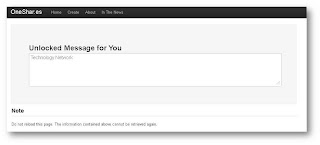
- If now an user try to refresh the page with same URL, it says that now URL is expired. Hence, self-destructed.


 When URL shorten came out, many of us take the advantage to shorten our long URL's. Also, it helps spammers to shorten their malicious URL too.
So, URL shortner has pros and cons. But there are websites which helps us to identify or preview the short URL 's for their complete expansion.
Here below are the some URL expander sites which u would like to visit and differentiate the Malicious URL.
Else, Install for Firefox or Chrome extension to Expand bitly links (and many other short links) on any web page to see page titles and links to bitly Info pages before clicking.

