


Showing posts with label Security. Show all posts
Showing posts with label Security. Show all posts

With the social networking sites like Facebook and twitter a possible cause would be using your personal information, posting a fake status about you, subscribing/following to anonymous websites/blogs/users etc.
Key: Have strong Passwords.
One of the most important key to protect your online security is to have the strong passwords which can change frequently. Since, to set the strong passwords is bit tricky and even to remember the passwords for various sites is more challenging for us.
One of the way to create these strong passwords is to set a phrase which can be used to enter as password. But doing this you may feel time consuming for entering the complete phrase. So, either way you can use the initials of the phrase. For instance, "IboTNu#B.C" for 'I blog on technology network using blogger.com'. While doing this you are aware of the variants like upper-case, symbols and letters used with there meaningful presence in the passwords. Microsoft has an excellent suggestions on password creation and a password strength checker.
More Tips:
- Don't use same passwords for all sites : Even if you create a strong passwords, don't use same for it every sites. Since, if hacker steals your passwords from any of the sites you logged in. It can be used to break into accounts for your other sites. Hence, you need to be more tricky here while using your strong passwords for different sites such as you may use the initials of the sites in your string passwords. For example: for Google account you could have "Go" lying somewhere in your password and "Fb" could be used for Facebook Account.
- Do have Extra Security for your financial Websites: Here your may strengthen your password more by inserting some more letters, symbols or numbers.
Hopefully, after reading the above post, we all might have configured our strong passwords.

 |
We may not need to get forwarded these messages over and over to multiple users. Also, some message need to be deleted after a period of time.
So, to accomplish this task for self destruction after an single access to data and keeping safe; Oneshar.es come with an tool to provide an Secure data transmission and self-destruction of message. These web tool provides users to share private information either using android phones or by browser.
How it Works:
-
The data that you want to share privately is entered to the input box (1000 Max character).

- It then encrypts your confidential data and stored in an encrypted format on server. It then provides you the key URL in order to share the information.

- These URL can be send to receiver by any channel. After accessing the key URL the information is displayed to receiver for the first time.
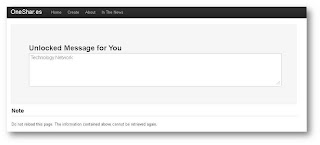
- If now an user try to refresh the page with same URL, it says that now URL is expired. Hence, self-destructed.


 When URL shorten came out, many of us take the advantage to shorten our long URL's. Also, it helps spammers to shorten their malicious URL too.
So, URL shortner has pros and cons. But there are websites which helps us to identify or preview the short URL 's for their complete expansion.
Here below are the some URL expander sites which u would like to visit and differentiate the Malicious URL.
Else, Install for Firefox or Chrome extension to Expand bitly links (and many other short links) on any web page to see page titles and links to bitly Info pages before clicking.
 Gmail started 2-step verification which adds an extra layer of security to your Google account by requiring you have to access your phone as well as username and password.
These means that even if some steals or guess your password, then too the hackers still wont be able to access your account since they don't have your phone.
How you sign-in with 2 steps:
- When you access any Google products, enter your username and password.
- You will then next be asked to enter the verification code, which you get on your phone. You have to do only once in every 30 Days if you choose.
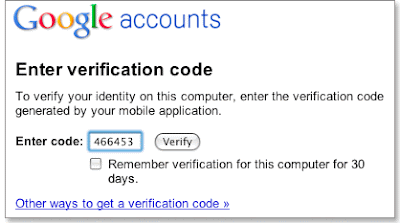


How to get started:
So you ready to make your account secure?. The step is now to see whether your account is eligible for 2-step verification yet. To do this you have, visit Google account and look for the Using 2-step verification link. If found you can start the setup process.
 Note:
- If 2-step verification is not enabled on your account then be patient - all Google account will be enabled soon.
 Secure your removable pen drives using passwords tool USB Safeguard. It is an portable software which encrypts and protect the data with a password using AES 256 bits encryption.
This is an key software which protects your confidential data stored inside an removable pen drives.
It supports extremely powerful security solution to protect the valuable data stored in an pen drive. Also, it has an very useful feature that allows you to store the email and phone no. in case you loose you pen drive.

List of Features:
- No Installation required.
- AES 256 bits Encryption.
- 100% portable.
- Assign Email and Phone no.
- It works with only USB flash drive with max size of 2GB.
- Full Version (Costs EUR 10 ~ 600 INR) supports max size up to 128GB Flash Drive.
- It does not work with external hard drives.
Official Website : http://usbsafeguard.altervista.org/
 Normally, on Facebook we visit our friend's profile to view the profile, in case if we want to know about the people who visited and viewed profile. Hence, an Petitions that let Facebook users to view who visited their profiles, and numerous apps that claim to offer an access.
Here is an another scam apps that we have to watch for, like other apps that promises to show you the who visited your profile. Don't Fall in it, installing the app and giving it rights to access your information will not only take you to close to spying attacks but also post an link on your wall.
The app has been spreading rapidly on Facebook via the message, "OMG OMG OMG" I cant believe this actually works! Now you really can see who viewed your profile! on http://bit.ly/aFNPAb".

According to bit.ly these one link had received over 55,000 clicks :

Sopos- an security firm conveys that your profile will be the victim of these viral scam - spreading the message to all of your Facebook friends because you continue...
See the snapshot of App:

 A new Firefox Trojan had been discovered that forces the browser to save password and used them on an infected PC to create new user account.
The Trojan-PWS-Nslog malware was discovered by security Company Webroot. Actually the Trojan adds a few lines of the code and comments out the other portions of the code from the file of the Firefox file called "nsLoginManagerPrompter.js" with the result that all the passwords get saved locally without any input from the user.
The Trojan Creates a new account under the name "Maestro" on the infected computer. It then "scrapes information from the registry, from the so-called Protected Storage area used by IE to store passwords, and from Firefox's own password storage, and tries to pass the stolen information onward, once per minute - added by Webroot researcher Andrew Brandt.
Webroot can easily identify and remove the Trojan from infected machines, it says. To fix the modified Firefox file, users should download the latest Firefox installer and install it over the existing installation. No bookmarks or add-ons will be lost in the process, Brandt said.
Since, Firefox ranks 2nd in Browser market, also by default it does remember password. to avoid to these, go to tools in menu and select options, select security tab and uncheck the remember password, Webroot Advices.
So, be safe while browsing from our all time favorite Mozilla Firefox ..
 According to the news recently Gmail users received an notice from the Gmail team to update their account details for the security reasons. This particular legal notice from Gmail requested the users to update their account name, password, occupation, birth date and country of residence etc..
It also includes the warning that the users which are unable to update the above details within next 7 Days then they would loose there Gmail account permanently.
The Mail also includes that "Gmail Team is working on total security on all accounts in order to make Gmail better as ever and as a result of this security upgrade we require all Gmail members to verify their account with Google. To prevent your account from disability you will have to update your account by clicking the reply button and filling the space below."
These phishing activity has been rise since from December, also its biggest target is Banking Sites but now its followed by free email services such as Gmail, Yahoo etc.. & with Social Networking Sites such as Orkut, Facebook etc..
While discussing the issue one of the staff from Google said that, we always advise our users to be wary of any message that asks for your personal information, or messages that refer you to a web page asking for personal information. Google or Gmail does not send unsolicited mass messages asking for passwords or personal information; even if the message asking for it claims to be from us, please don't believe it.
So please be sure & careful for clicking such links & updating such details. We do know that it is an hard job to identify between the fake & original notices. But still we should be well enough to handle these attack from now.
-Siliconindia.com
 As many as 3,286 websites were attacked in India between January and June 2009, most of them of various government organizations. According to the CERT-In (Indian Computer Emergency Response Team) of the Department of Information Technology, there has been an increase in the attacks on government websites from January 2005 to February 2008.
"We are aware of the attacks on National Informatics Centre, the IT mainstay of the Indian Government, which was attacked by GhostNet, allegedly by a China based cyber spy ring. In 2008 alone cyber attackers defaced over 4,000 Indian portals out of which 100 were Indian government Sites," said Sridhar Jayanthi, Senior Vice President (Engineering) and Head of Operations - India, McAfee to Indian Express.
The website easternrailway.gov.in was also hacked recently. "We have also seen hackers turning an Indian Bank website into a malware distributing source recently," he added.
The attacks have come under the scanner in view of the Virtual Criminology report published by McAfee. "As an initial step the government has set up a National Security Council to prevent cyber attacks," explained Jayanthi. It is the private sectors, experts say, that are more at risk of an attack. "Private sectors in India too need to build a strong defense mechanism as today a majority of their infrastructure is connected to the Internet," he said.
-By siliconindia news bureau.
 Bangalore: A Seattle based computer security consultant says he has developed a new way to exploit a recently disclosed bug in the Secure Sockets Layer (SSL) protocol, used to secure communications on the internet. The attack, while difficult to execute, could help attackers to inflict very powerful phishing attacks.
Frank Heidt, Chief Executive of security engineering consultancy Leviathan Security Group, says his "generic" proof-of-concept code could be used to attack a variety of websites. While the attack is extremely difficult to pull off - the hacker would first have to first pull off a man-in-the-middle attack, running code that compromises the victim's network - it could have devastating consequences, reports InfoWorld.
The attack exploits the SSL Authentication Gap bug, first disclosed on November 5. One of the SSL bug's discoverers, Marsh Ray at two-factor authentication provider PhoneFactor, says he has seen a demonstration of Heidt's attack, and he is convinced it could work. "He did show it to me and it's the real deal," Ray said.
The SSL Authentication flaw gives the attacker a way to change data being sent to the SSL server, but there's still no way to read the information coming back. Heidt sends data that causes the SSL server to return a redirect message that then sends the web browser to another page. He then uses that redirect message to move the victim to an insecure connection where the web pages can be rewritten by Heidt's computer before they are sent to the victim. "Heidt has shown a way to leverage this blind plain text injection attack into a complete compromise of the connection between the browser and the secure site," Ray said.
A consortium of internet firms has been working to fix the flaw since the PhoneFactor developers first uncovered it several months ago. Their work gained new urgency when the bug was inadvertently disclosed on a discussion list. Security experts have been debating the severity of this latest SSL flaw since it became public knowledge.
- By siliconindia news bureau

London: When a new virus hits the Internet, there is little that an anti-virus software can do to stop the malware on the very day. But now British engineers have come up with an answer to the problem. Engineers Simon Wiseman and Richard Oak from defence technology company Qinetiq, Worcestershire, have found a way to stop computer viruses in their tracks by intercepting every file that could possibly hide a virus and adding a string of computer code to it that will disable any virus it Contains.
Their technique mainly targets emailed attachments and adds the extra code to them as they pass through a mailserver. A key feature of the scheme, which they are patenting, is that no knowledge of the virus itself is needed, so it can deal with new, unrecognised 'zero day' viruses as well as older ones, reports New Scientist.
Many mailservers already block attachments that will run as executable programs - such as PC files with a .exe suffix - in case they are viruses. But virus writers have tricks up their sleeve to get round this. For example, they can disguise files as an innocent Microsoft Word (.doc) or Adobe Acrobat (.pdf) file to fool unsuspecting users into converting them into an 'executable' program file that will run on their computer.
Qinetiq aims to prevent this by inserting a line of machine code - the raw code that microprocessor chips understand - into the header area of incoming files.
Their technique mainly targets emailed attachments and adds the extra code to them as they pass through a mailserver. A key feature of the scheme, which they are patenting, is that no knowledge of the virus itself is needed, so it can deal with new, unrecognised 'zero day' viruses as well as older ones, reports New Scientist.
Many mailservers already block attachments that will run as executable programs - such as PC files with a .exe suffix - in case they are viruses. But virus writers have tricks up their sleeve to get round this. For example, they can disguise files as an innocent Microsoft Word (.doc) or Adobe Acrobat (.pdf) file to fool unsuspecting users into converting them into an 'executable' program file that will run on their computer.
Qinetiq aims to prevent this by inserting a line of machine code - the raw code that microprocessor chips understand - into the header area of incoming files.
- By siliconindia news bureau


